Event: email (EN)
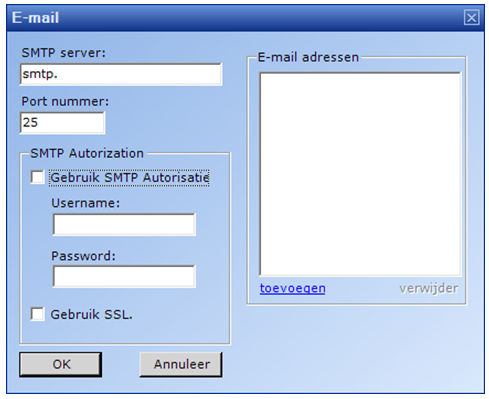
This is where the e-mail settings are specified.
An SMTP server is required. If necessary, an authorization username and password can be specified.
By clicking 'add' e-mail addresses can be created.
Determine the content of an e-mail message
The alert message by e-mail contains a standard message supplemented with time of detection, computer description from the configuration file and sound source.
If desired, the subject and content of the e-mail message can be adjusted. Additional configuration options are available in the configuration file RTVSilenceDetection.exe.config.
Note: the configuration file is of the XML type and must be a valid XML file. If the XML is not valid, the application will not start.
For the subject of a mail message, the following two keys can be added to the configuration file:
<add key="SilenceAlarm.Email.Subject" value="Dit is het onderwerp bij een stilte bericht"/>
<add key="Modulation.Email.Subject" value="Dit is het onderwerp indien audio terug wordt gedetecteerd"/>
The first is at silence, the second at modulation during alarm.
If the value is empty, a default subject is given.
For contents of a message (body), add these two keys to the configuration file:
<add key="SilenceAlarm.Email.Body.File" value="SilenceAlarm_Email.txt"/>
<add key="Modulation.Email.Body.File" value="Modulation_Email.txt"/>
The first "value" is a reference to a text file whose content is used as a body in case of silence. The second for modulation detection.
- The value is a filename and can be entered without path. Then the file is searched in the application folder. Or else with path (e.g. c:\stilte\body_alarm.txt).
- The content must be text and may be HTML. The mail is sent as HTML body.
- If the file is not found or cannot be read, the default text will be used.
In the text as subject variables can be used:
| Variable | Omschrijving |
|---|---|
| %COMPUTERDESCRIPTION% | The computer description as specified in the configuration file under "ComputerDescription". |
| %HOSTNAME% | Network name of the machine on which the silence detection is running |
| %WHEN% | Time of detection |
| %SOUNDDEVICE% | Omschrijving van apparaat die voor detectie wordt gebruikt |
Example of a text file:
<p>This is a message from the silence detection. </p>
<p>Silence is detected since %WHEN% with sounddevice %SOUNDDEVICE%</p>
(c) RTVSoftware - https://www.rtvsoftware.nl